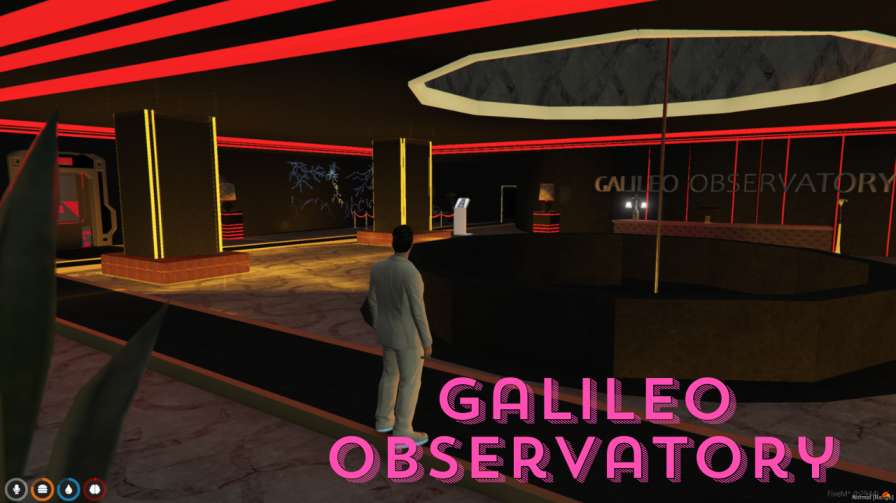
Explore the Galileo Observatory mod Features stunning architecture and educational exhibits Enjoy scenic views and storyline integration for immersive gameplay




Bridges ship across the catalogue. Confirm the cores for this listing in Requirements below.
Ready to elevate your FiveM experience? The Galileo Observatory drops a breathtaking landmark onto Mount Chiliad, turning every sunrise into a cinematic moment. Inspired by LA’s iconic Griffith Observatory, this mod packs stunning architecture, towering columns, and a gleaming dome that instantly becomes the talk of Los Santos. Dive inside to discover educational exhibits on astronomy, space missions, and celestial wonders—all while soaking in panoramic views that make in‑game photography a delight.
Beyond its visual wow‑factor, the Galileo Observatory integrates seamlessly into GTA V’s storyline, serving as a backdrop for missions and events that deepen immersion. Whether you’re a lore‑hunter, a photo‑enthusiast, or just love exploring new spaces, this mod offers a multi‑layered experience that feels both real and exhilarating.
Download, extract, drop the files into your GTA V folder, activate via your server console, and you’re set. The mod is compatible with both Windows and Linux FiveM servers and works with ESX, QBCore, or standalone setups.
Got questions? Need help? Our support team is ready to assist. Add the Galileo Observatory today and watch your server’s skyline transform into a masterpiece of virtual architecture.
This resource is built to be compatible with modern FiveM frameworks. Check the requirements for your framework version and installed resources before buying.
Yes, purchasing this asset grants you lifetime access to all future updates and patches.
Check the product requirements for file access and licensing details. If you need editable source files or a specific integration, contact support before buying.
After successful payment, sign in to your xFiveM Shop dashboard to access your purchased downloads. Contact support if your download is unavailable.
Review framework support, dependencies and editable files before buying. Contact support if your server uses a custom framework or needs a particular integration.
No waiting and no Keymaster syncing needed. Receive your clean, zip archive direct download link instantly in your dashboard right after your purchase.
Pay once and get every future update for free. When FiveM releases new builds or features, we update our scripts so your server stays up to date.
Complete your secure checkout. You will receive an instant download link to get your files immediately.
Extract the zip file and place the folder inside your server's resources directory.
Add ensure resource-name to your server.cfg and restart.

 FiveM
FiveM