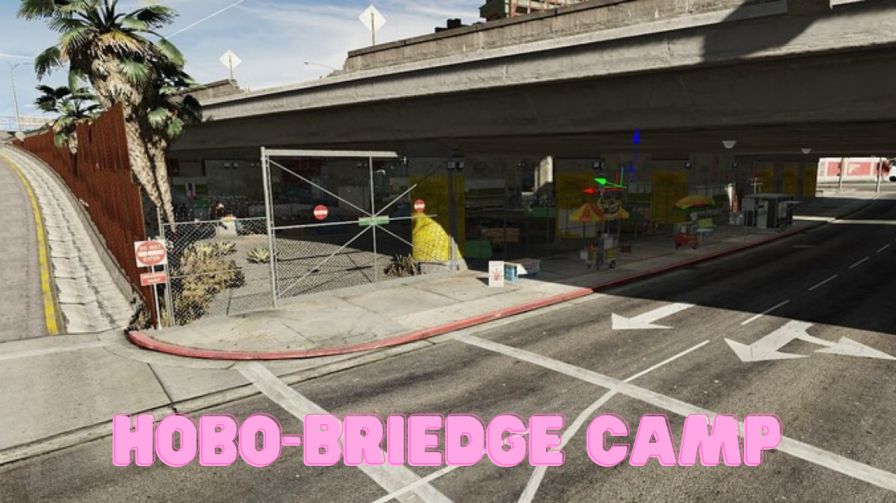
Detailed tents and shelters Atmospheric campfires and lighting Interactive sleeping and gathering areas Realistic roleplay setting for portraying homelessness Seamless integration into FiveM servers




Bridges ship across the catalogue. Confirm the cores for this listing in Requirements below.
FiveM Hobo Bridge Camp MLO drops you into a gritty, immersive world beneath the bridge where the struggle is real and the stories are endless. This detailed map packs tents, makeshift shelters, crackling campfires, and dim atmospheric lighting to create a hauntingly authentic homeless camp.
Whether you’re a cop on patrol, a social worker, or a wanderer seeking shelter, the camp offers interactive sleeping areas, resource gathering spots, and salvaging zones that spark dynamic roleplay. Players can set up camp, trade, or even stage rescue missions, fostering empathy and deep storytelling.
Every tent is meticulously modeled, while the flickering firelight and shadows add a cinematic feel. The layout encourages player interaction—set up a fire, share a story, or hide from the authorities. The MLO integrates seamlessly with ESX, QBCore, or any standalone script, so you’re ready to go after a quick file drop.
Just drop the FiveM_Hobo_Bridge_Camp_MLO folder into your resources, add start FiveM_Hobo_Bridge_Camp_MLO to your server.cfg, restart, and the bridge camp appears. No extra dependencies, no hassle.
Designed for mature audiences, this map encourages thoughtful roleplay about homelessness, community, and survival. It’s a powerful tool for servers that want to push narrative boundaries and offer players a fresh, emotional experience.
This resource is built to be compatible with modern FiveM frameworks. Check the requirements for your framework version and installed resources before buying.
Yes, purchasing this asset grants you lifetime access to all future updates and patches.
Check the product requirements for file access and licensing details. If you need editable source files or a specific integration, contact support before buying.
After successful payment, sign in to your xFiveM Shop dashboard to access your purchased downloads. Contact support if your download is unavailable.
Review framework support, dependencies and editable files before buying. Contact support if your server uses a custom framework or needs a particular integration.
No waiting and no Keymaster syncing needed. Receive your clean, zip archive direct download link instantly in your dashboard right after your purchase.
Pay once and get every future update for free. When FiveM releases new builds or features, we update our scripts so your server stays up to date.
Complete your secure checkout. You will receive an instant download link to get your files immediately.
Extract the zip file and place the folder inside your server's resources directory.
Add ensure resource-name to your server.cfg and restart.

 FiveM
FiveM