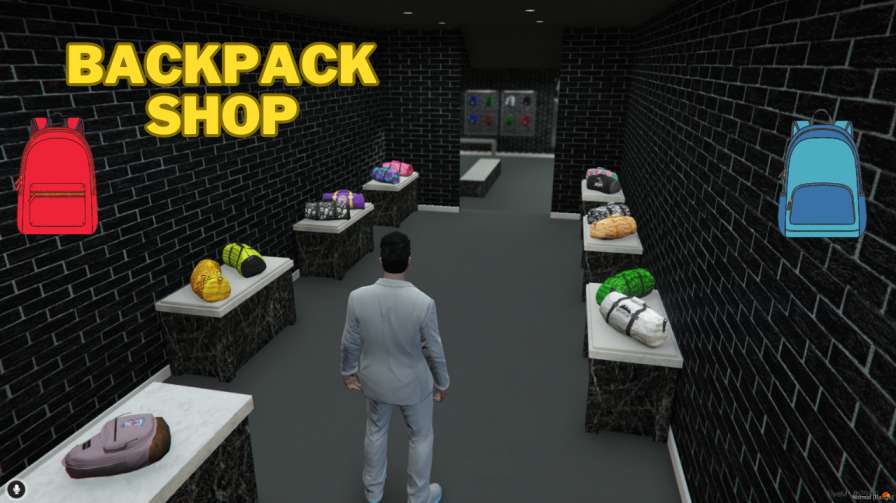
Upgrade your FiveM roleplay experience with our premium Backpack Shop MLO! Enjoy a wide selection of backpacks, convenient location, and stunning interior design. Get the best FiveM Backpack Shop MLO today and elevate your roleplay server!




Bridges ship across the catalogue. Confirm the cores for this listing in Requirements below.
Looking to level up your FiveM server? The Backpack Shop MLO is the answer! This plug‑and‑play interior gives your players a vibrant, fully optimized shop where they can browse an extensive range of backpacks – from sleek leather to rugged tactical styles. With a premium design, convenient location, and easy installation, it’s the perfect addition to any role‑play environment.
Our MLO is engineered for performance and realism. Every detail, from the polished countertops to the realistic shelving, has been crafted to immerse players in a believable retail experience. The shop’s coordinates (393.5533, 82.39963, 110.9371) place it in a high‑traffic area, making it a natural gathering spot for community events, trade, and role‑play interactions.
Installation is a breeze: simply drop the BackpackShop folder into your server and reference it in your server.cfg. No complicated scripts or dependencies – just instant, ready‑to‑use functionality.
• Plug‑and‑play FiveM ready
• Fully optimized for performance
• Premium interior design
• Variety of backpack styles
• Convenient, high‑traffic location
Elevate your server’s economy and player engagement with a shop that looks great, runs smoothly, and feels authentic. Whether you’re hosting a casual role‑play community or a competitive economy server, the Backpack Shop MLO adds depth and excitement to every visit.
This resource is built to be compatible with modern FiveM frameworks. Check the requirements for your framework version and installed resources before buying.
Yes, purchasing this asset grants you lifetime access to all future updates and patches.
Check the product requirements for file access and licensing details. If you need editable source files or a specific integration, contact support before buying.
After successful payment, sign in to your xFiveM Shop dashboard to access your purchased downloads. Contact support if your download is unavailable.
Review framework support, dependencies and editable files before buying. Contact support if your server uses a custom framework or needs a particular integration.
No waiting and no Keymaster syncing needed. Receive your clean, zip archive direct download link instantly in your dashboard right after your purchase.
Pay once and get every future update for free. When FiveM releases new builds or features, we update our scripts so your server stays up to date.
Complete your secure checkout. You will receive an instant download link to get your files immediately.
Extract the zip file and place the folder inside your server's resources directory.
Add ensure resource-name to your server.cfg and restart.

 FiveM
FiveM