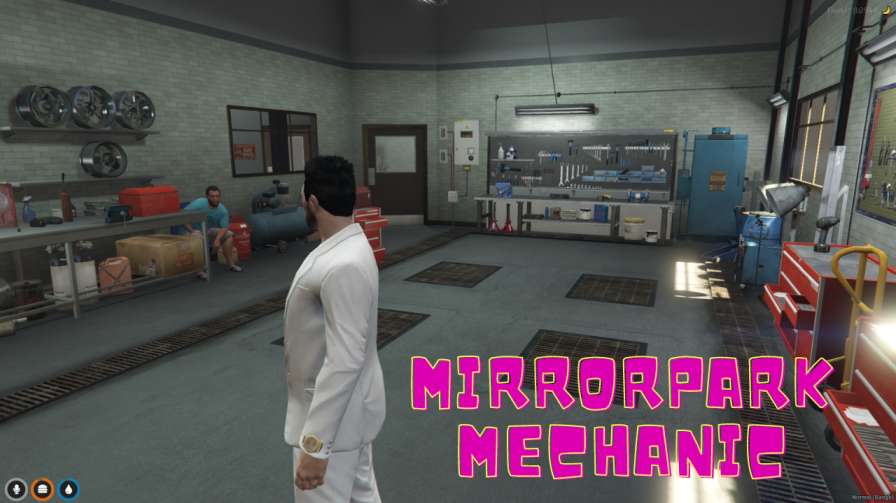
Fix and upgrade cars in Mirror Park Mechanic MLO. Inside, find tools, repair machines, and safe areas. It works on computers and phones for easy playing.




Bridges ship across the catalogue. Confirm the cores for this listing in Requirements below.
Mirror Park Mechanic MLO drops you into a fully realized automotive repair haven right in GTA V's scenic Mirror Park. From the moment you walk through reinforced doors, the shop's state‑of‑the‑art equipment and sprawling work bays scream realism, giving players a genuine garage vibe.
Every corner is packed with detail—tool racks line the walls, diagnostic machines beep with life, and a comfy waiting area invites patrons to chill while their rides get tuned. Surveillance cameras keep the space secure, so you can focus on the grind without worry.
Whether you need a quick oil change, a full engine overhaul, or flashy performance upgrades, this MLO covers it all. The modular setup lets server owners add custom services, making each visit unique.
Built for both PC and mobile FiveM players, the Mirror Park Mechanic MLO integrates smoothly with ESX, QBCore, or standalone setups. Installation is a breeze—just drop the files into your resources folder, add the entry to your config, and restart the server.
Realistic experience: Detailed interiors and functional equipment bring garage life to the virtual world.
Security first: Reinforced doors and cameras protect vehicles and players.
Flexible access: Play on PC or mobile without missing a beat.
Easy setup: No coding required, just follow the simple guide.
Get ready to turn heads in Mirror Park—your ultimate mechanic hub awaits!
This resource is built to be compatible with modern FiveM frameworks. Check the requirements for your framework version and installed resources before buying.
Yes, purchasing this asset grants you lifetime access to all future updates and patches.
Check the product requirements for file access and licensing details. If you need editable source files or a specific integration, contact support before buying.
After successful payment, sign in to your xFiveM Shop dashboard to access your purchased downloads. Contact support if your download is unavailable.
Review framework support, dependencies and editable files before buying. Contact support if your server uses a custom framework or needs a particular integration.
No waiting and no Keymaster syncing needed. Receive your clean, zip archive direct download link instantly in your dashboard right after your purchase.
Pay once and get every future update for free. When FiveM releases new builds or features, we update our scripts so your server stays up to date.
Complete your secure checkout. You will receive an instant download link to get your files immediately.
Extract the zip file and place the folder inside your server's resources directory.
Add ensure resource-name to your server.cfg and restart.

 FiveM
FiveM