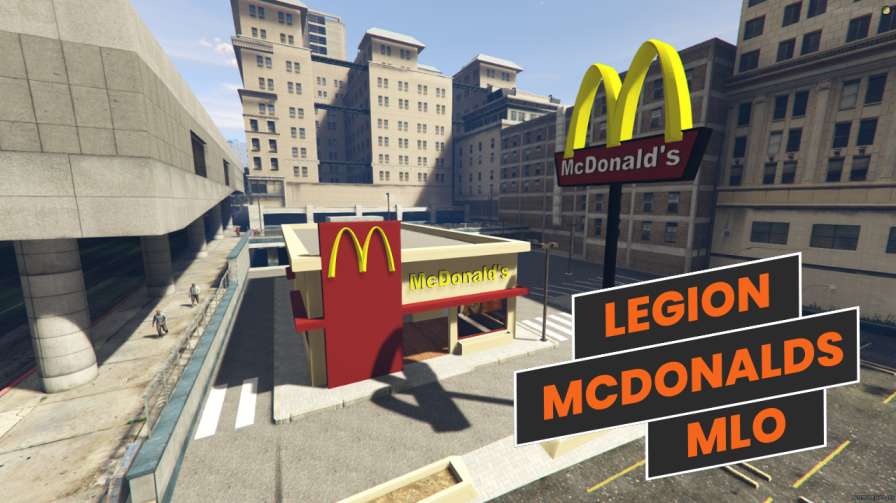
Stunning Exterior & Best MLO Ever Coordinates: 218.115448, -780.492065, 30.464798




Bridges ship across the catalogue. Confirm the cores for this listing in Requirements below.
Tired of generic FiveM restaurants that look like boring boxes? It's time to level up your server with the Legion Square McDonald's MLO – a plug-and-play masterpiece that will have your players lining up for a Big Mac in style. This isn't just a mod; it's a complete fast food experience with stunning interiors, optimized performance, and a killer exterior that fits perfectly into the iconic Legion Square. Whether you're running an ESX, QBCore, or standalone server, this McDonald's MLO is ready to serve.
Step inside and you'll be blown away by the detailed interior – from the fully equipped kitchen and buzzing dining area to a modern billing system that makes roleplay feel real. The exterior blends seamlessly with Legion Square’s architecture, giving your city a believable, immersive fast food joint that players will actually want to visit. Every texture, every prop has been hand-crafted for maximum visual impact without hammering your server's performance.
We know lag kills the vibe, so this McDonald’s MLO is fully optimized for low resource usage. Drop the file into your server.cfg, restart, and you’re live – no complicated configuration, no headaches. The coordinates are set: 218.115448, -780.492065, 30.464798. Just paste, restart, and watch your players flood in.
Roleplay servers thrive on detail, and a recognizable, high-quality fast food spot gives your economy and social scenes a natural hub. Players can order food, work as crew, or just hang out. It’s the perfect addition for any serious FiveM community. Plus, it’s compatible with ESX, QBCore, and standalone, so no matter your setup, you’re covered.
Don't settle for boring generic restaurants. Give your players the best McDonald's MLO on the market. Download the Legion Square McDonald's MLO now and transform your server today!
This resource is built to be compatible with modern FiveM frameworks. Check the requirements for your framework version and installed resources before buying.
Yes, purchasing this asset grants you lifetime access to all future updates and patches.
Check the product requirements for file access and licensing details. If you need editable source files or a specific integration, contact support before buying.
After successful payment, sign in to your xFiveM Shop dashboard to access your purchased downloads. Contact support if your download is unavailable.
Review framework support, dependencies and editable files before buying. Contact support if your server uses a custom framework or needs a particular integration.
No waiting and no Keymaster syncing needed. Receive your clean, zip archive direct download link instantly in your dashboard right after your purchase.
Pay once and get every future update for free. When FiveM releases new builds or features, we update our scripts so your server stays up to date.
Complete your secure checkout. You will receive an instant download link to get your files immediately.
Extract the zip file and place the folder inside your server's resources directory.
Add ensure resource-name to your server.cfg and restart.

 FiveM
FiveM