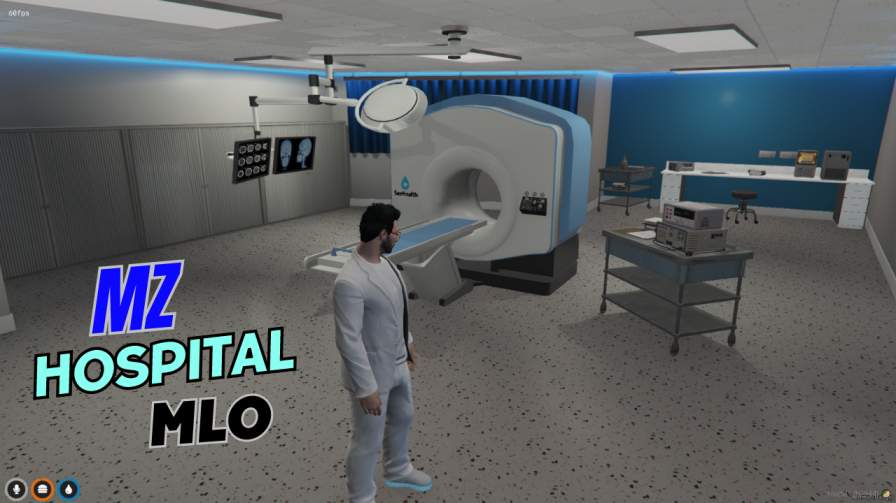
FiveM Ready: Optimized for smooth gameplay on your server. Premium Quality: Detailed design and advanced features. Multi-Level Medical Center: Explore intricate interiors across all floors. Fully Equipped: Reception, consultation rooms, operating theatres, labs, and more! Simple Setup: Easy ...




Bridges ship across the catalogue. Confirm the cores for this listing in Requirements below.
Looking for a realistic medical role‑play hub? The FiveM MZ Hospital MLO drops you straight into a fully detailed hospital where you can be a doctor, nurse, paramedic, or even a patient. From bustling emergency rooms to sterile operating theaters, every corridor feels authentic, giving your server an immersive medical experience that keeps players coming back for more.
Designed with both players and server owners in mind, the MZ Hospital MLO offers a comprehensive layout that includes emergency bays, surgical suites, patient wards, and administrative offices. The environment supports dynamic scenarios—think trauma triage, complex surgeries, and routine check‑ups—so you can script events or let spontaneous role‑play unfold.
Plug‑and‑play simplicity means you can upload the files, adjust a few config lines, and restart your server to have the hospital live in minutes. Need a unique look or extra rooms? The MLO is fully customizable, letting you tweak textures, add props, or integrate with other FiveM resources without hassle.
Medical role‑play naturally encourages teamwork, communication, and problem‑solving. Whether you’re hosting a emergency response drill or a casual night‑shift role‑play, the MZ Hospital becomes a hub for community engagement, fostering stronger player bonds and longer session times.
Ready to transform your server? Add the FiveM MZ Hospital MLO today and let the healing—and the fun—begin!
This resource is built to be compatible with modern FiveM frameworks. Check the requirements for your framework version and installed resources before buying.
Yes, purchasing this asset grants you lifetime access to all future updates and patches.
Check the product requirements for file access and licensing details. If you need editable source files or a specific integration, contact support before buying.
After successful payment, sign in to your xFiveM Shop dashboard to access your purchased downloads. Contact support if your download is unavailable.
Review framework support, dependencies and editable files before buying. Contact support if your server uses a custom framework or needs a particular integration.
No waiting and no Keymaster syncing needed. Receive your clean, zip archive direct download link instantly in your dashboard right after your purchase.
Pay once and get every future update for free. When FiveM releases new builds or features, we update our scripts so your server stays up to date.
Complete your secure checkout. You will receive an instant download link to get your files immediately.
Extract the zip file and place the folder inside your server's resources directory.
Add ensure resource-name to your server.cfg and restart.

 FiveM
FiveM