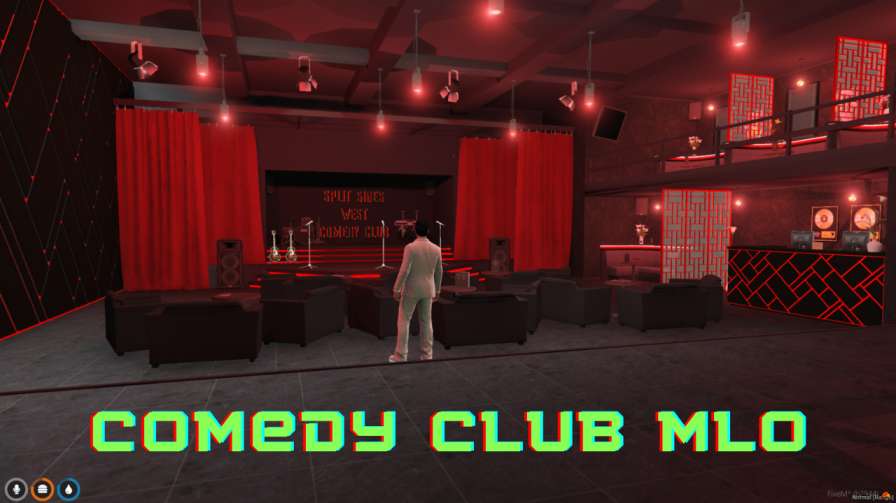
Have fun at FiveM Comedy Club MLO. Laugh with comedians and friends. Get it on your phone for comedy anytime.




Bridges ship across the catalogue. Confirm the cores for this listing in Requirements below.
FiveM Comedy Club MLO brings a vibrant, laugh‑filled venue straight to your virtual world. Within the first 100 words, you’ll discover a digital comedy haven where stand‑up, improv, and sketch acts keep players entertained night after night. Picture neon lights, a buzzing crowd, and a stage ready for any jokester—perfect for server owners craving fresh, community‑building content.
Walk through a meticulously crafted club interior, complete with dynamic lighting, realistic sound effects, and a bustling audience that reacts to every punchline. The environment is fully interactive, letting players chat with comedians, cheer for their favorite acts, or even hop on stage for a spontaneous routine.
From razor‑sharp one‑liners to improv madness, the MLO supports a variety of comedic styles. Server admins can script custom shows or let players host their own events, ensuring fresh entertainment every session.
Optimized for both desktop and mobile, the Comedy Club MLO guarantees smooth performance across devices, so your community can laugh together whether they’re on a PC or a phone.
Beyond the jokes, this venue fosters camaraderie. Shared laughter creates lasting bonds, turning casual players into regulars. It’s also the perfect stress‑relief spot after intense missions—just sit back, grab a virtual drink, and let the humor wash over you.
Ready to upgrade your server’s entertainment? Download, install, and watch your community thrive in the most hilarious spot on FiveM.
This resource is built to be compatible with modern FiveM frameworks. Check the requirements for your framework version and installed resources before buying.
Yes, purchasing this asset grants you lifetime access to all future updates and patches.
Check the product requirements for file access and licensing details. If you need editable source files or a specific integration, contact support before buying.
After successful payment, sign in to your xFiveM Shop dashboard to access your purchased downloads. Contact support if your download is unavailable.
Review framework support, dependencies and editable files before buying. Contact support if your server uses a custom framework or needs a particular integration.
No waiting and no Keymaster syncing needed. Receive your clean, zip archive direct download link instantly in your dashboard right after your purchase.
Pay once and get every future update for free. When FiveM releases new builds or features, we update our scripts so your server stays up to date.
Complete your secure checkout. You will receive an instant download link to get your files immediately.
Extract the zip file and place the folder inside your server's resources directory.
Add ensure resource-name to your server.cfg and restart.

 FiveM
FiveM