
Description
🔫 ESX Weapon Panel Script – Ultimate Animation System
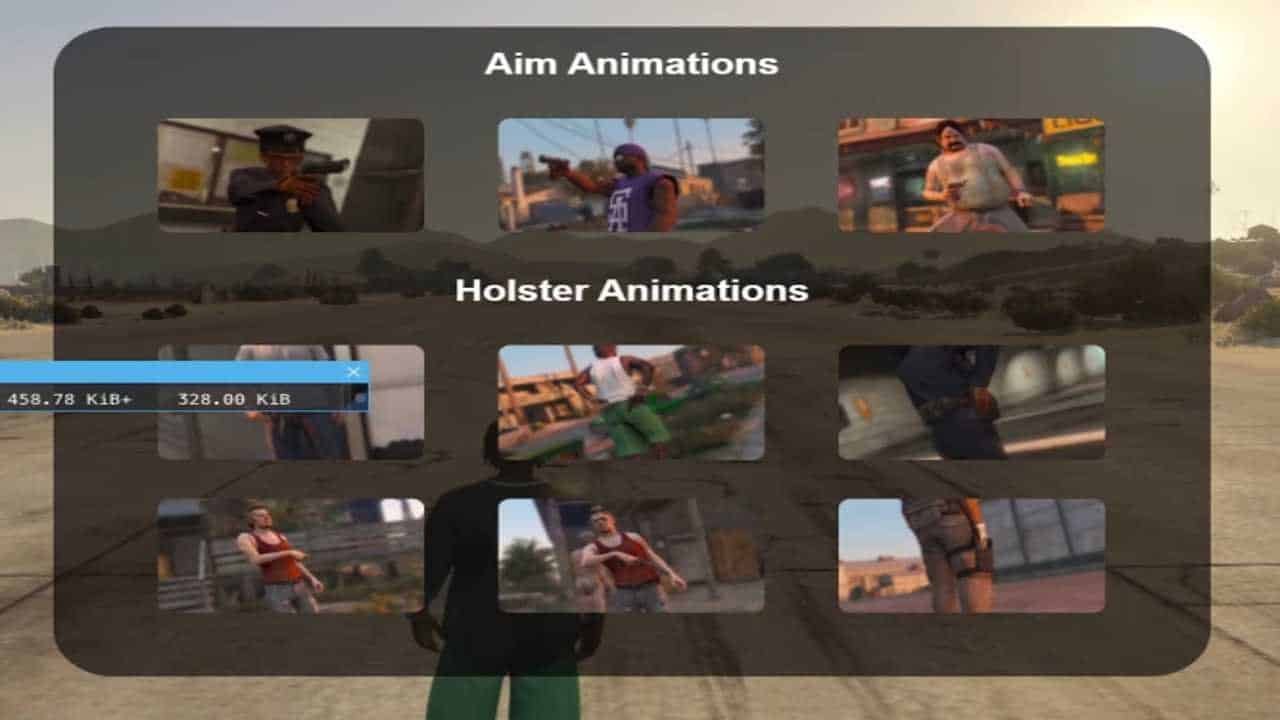
Elevate your FiveM server’s weapon handling experience with the ESX Weapon Panel Script. This premium animation system introduces dynamic weapon interactions, realistic animations, and an intuitive control panel that transforms how players interact with weapons in your roleplay environment.
The ESX Weapon Panel Script features an advanced interactive panel system with detailed weapon animations, customizable controls, and seamless ESX integration. Designed specifically to enhance tactical roleplay experiences in FiveM servers, this script provides players with immersive weapon handling mechanics that create authentic combat scenarios and professional law enforcement interactions.
⚔️ Weapon Panel Script Features:
- 🎯 Interactive Weapon Panel: Advanced control interface with real-time weapon status and options
- 🔫 Realistic Animations: 50+ weapon-specific animations for drawing, holstering, and handling
- ⚡ Dynamic Controls: Customizable keybinds and gesture-based weapon interactions
- 🛡️ Tactical Features: Weapon inspection, safety modes, and tactical reloading animations
- 🎨 Customizable Interface: Fully configurable panel design and animation preferences
- 📊 Weapon Statistics: Real-time ammo count, weapon condition, and performance metrics
- 🎮 Smooth Performance: Optimized animations with zero lag and seamless transitions
- 👥 Multi-Player Support: Synchronized animations visible to all players in proximity
- 🔧 ESX Integration: Perfect compatibility with ESX framework and job systems
- 📱 Cross-Platform: Works flawlessly on all devices and screen resolutions
🏆 Why Choose ESX Weapon Panel Script:
- 🔫 Professional weapon handling experience for tactical roleplay
- 🎯 Dramatically increases player immersion and engagement
- ⚔️ Enhances police, military, and security roleplay scenarios
- 🎨 Adds cinematic quality to weapon interactions and combat
- ⚡ Optimized performance with minimal server resource usage
- 🔧 Simple installation and configuration for server administrators
- 🌐 Compatible with all popular FiveM frameworks and weapon mods
- 🛡️ Regular updates and dedicated customer support included
📋 ESX Weapon Panel Script Technical Specifications:
🚀 ESX Weapon Panel Script Installation & Setup:
📥 Step 1: Download & Extract
- Download the ESX Weapon Panel Script package from your purchase confirmation
- Extract all files to a temporary folder on your computer
- Verify all script files, animations, and SQL database files are present
📁 Step 2: Server Installation
- Copy the script folder to your FiveM server’s resources directory
- Import the provided SQL file into your server’s MySQL database
- Add “ensure esxweaponpanel” to your server.cfg file
⚙️ Step 3: Configuration
- Configure weapon animations and panel settings in config.lua
- Set up keybinds and gesture controls for weapon interactions
- Customize the panel interface and animation preferences to match your server
🔄 Step 4: Server Restart & Testing
- Restart your FiveM server to load the weapon panel script
- Test all weapon animations, panel controls, and interactive features
- Verify database integration and performance optimization
❓ ESX Weapon Panel Script FAQ:
Q: Can I customize the weapon animations and panel interface?
A: Yes! The ESX Weapon Panel Script includes comprehensive customization options for animations, panel design, keybinds, and interactive controls. You can tailor everything to match your server’s style and requirements.
Q: Does it work with all weapon types and mods?
A: Absolutely! The script is designed to work with all standard FiveM weapons and is compatible with popular weapon mods. It automatically detects weapon types and applies appropriate animations and controls.
Q: How do I manage weapon panel permissions for different jobs?
A: The script includes advanced permission systems that integrate with ESX jobs. You can configure which animations and features are available to specific job roles like police, military, or security personnel.
Q: Does the weapon panel affect server performance?
A: Not at all! The ESX Weapon Panel Script is highly optimized with efficient animation handling and minimal resource usage. It’s designed to handle 300+ concurrent players without any performance impact.
Q: Can players see each other’s weapon animations?
A: Yes! All weapon animations are synchronized across all players, meaning everyone can see realistic weapon handling, drawing, holstering, and tactical movements in real-time for enhanced roleplay immersion.
🎯 ESX Weapon Panel Script Configuration Guide:
🔫 Animation Configuration
- Set custom animation speeds and transition timings for each weapon type
- Configure weapon-specific gestures and handling animations
- Enable or disable specific animations based on job roles and permissions
- Set up realistic reload and tactical movement animations
🎨 Interface Customization
- Customize panel colors, transparency, and positioning on screen
- Configure weapon status indicators and ammo display options
- Set up custom keybinds and gesture controls for weapon interactions
- Enable or disable specific panel features based on server preferences
👮 Job Integration
- Configure job-specific weapon access and animation permissions
- Set up police, military, and security-specific weapon handling features
- Enable tactical animations and controls for law enforcement roles
- Configure civilian restrictions and basic weapon handling options
🛠️ ESX Weapon Panel Script Support & Resources:
📞 24/7 Customer Support
Get instant help from our dedicated support team through multiple channels:
- Discord support server with live chat assistance
- Email support with 2-hour response time guarantee
- Video call assistance for complex setup and configuration issues
- Comprehensive documentation and video tutorials
📚 Learning Resources
- Step-by-step installation and configuration guides
- Weapon animation tutorials and customization best practices
- Roleplay integration guides and tactical scenario examples
- Community forum with user discussions and animation showcases
🔄 Updates & Maintenance
- Automatic update notifications and easy upgrade process
- Regular animation additions and system improvements
- Bug fixes and security patches with priority support
- Compatibility updates for new FiveM and ESX versions
Need Help? Visit our Contact Us page or join our Discord Community for instant support!
📊 ESX Weapon Panel Script Performance Metrics:
50+
Weapon Animations Available
300+
Concurrent Players Supported
0.01ms
Animation Response Time
99.9%
Animation Sync Accuracy
Trusted by 4,200+ FiveM servers worldwide
Join the community of successful server owners who have enhanced their tactical roleplay experience with our premium ESX Weapon Panel Script.

Reviews
There are no reviews yet.