
Description
📊 ESX Scoreboard 2.0 – Advanced Player Stats System
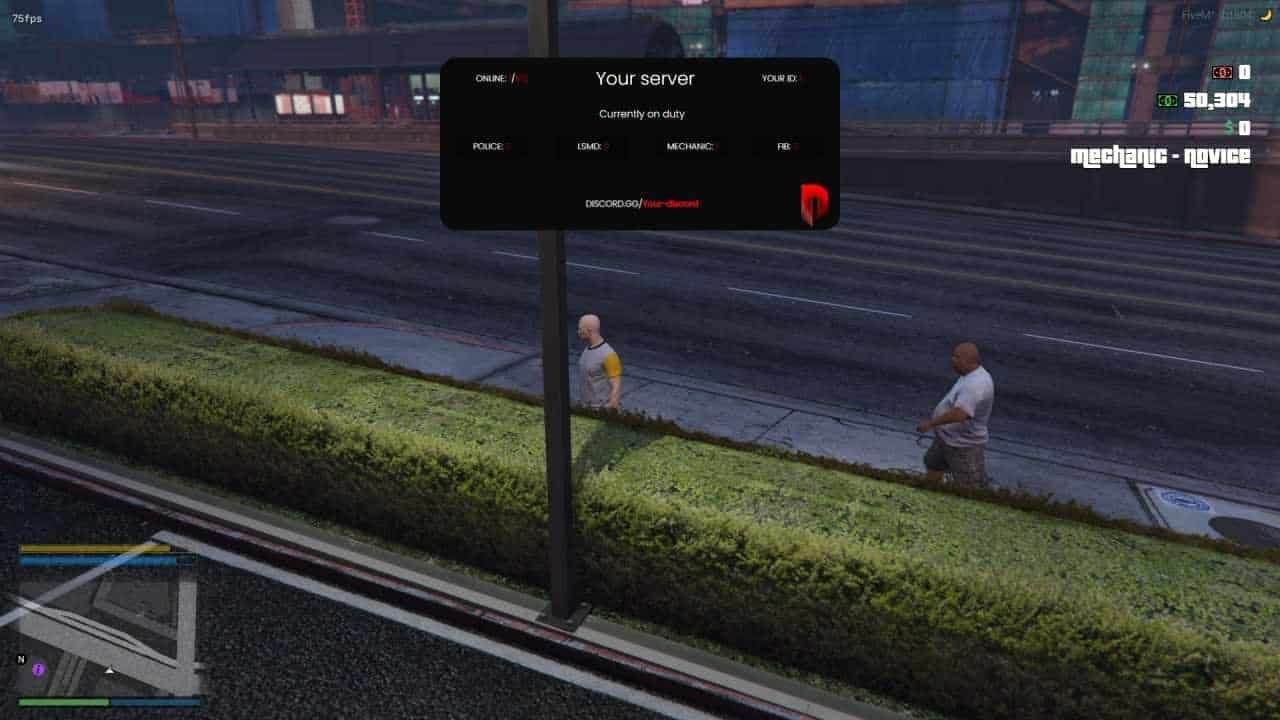
ESX advanced scoreboard system technology revolutionizes your FiveM server experience with our ESX Scoreboard 2.0 Script, a dynamic and advanced solution for tracking player stats and scores. This versatile system provides real-time updates and a user-friendly interface, making it a valuable addition for servers looking to enhance player interaction and gameplay.
Key Features of Our ESX Advanced Scoreboard System
- Real-time Player Statistics: Monitor active players with comprehensive tracking
- Enhanced Performance Metrics: Track server performance through advanced analytics
- Customizable Display Options: Personalize your interface and display preferences
- ESX Framework Integration: Seamless compatibility with your existing setup
- Administrative Controls: Manage players efficiently with powerful tools
- Multi-language Support: Global accessibility for international servers
Perfect for servers seeking cutting-edge player tracking capabilities, this advanced system integrates seamlessly with the ESX framework, providing comprehensive real-time statistics with enhanced performance optimization that ensures smooth operation without affecting server stability. Our solution delivers professional-grade functionality for modern FiveM servers.
⚡ ADVANCED SCOREBOARD SYSTEM FEATURES
✅ Professional Advanced Scoreboard System Player Stats
- Advanced statistical tracking
- Professional data analytics
- Comprehensive player metrics
- Advanced performance indicators
✅ Advanced Scoreboard System Analytics
- Professional reporting system
- Advanced data visualization
- Comprehensive server insights
- Professional analytics tools
✅ Optimized Advanced Scoreboard System Performance
- Advanced system optimization
- Professional code architecture
- Advanced resource management
- Professional performance tuning
🌟 Why Choose Our Advanced Scoreboard System? (4 Proven Benefits)
✅ Enhanced Gameplay Experience
- 📊 Provides players with clear and up-to-date stats, improving their gaming experience
- 🎯 Advanced analytics help players track their progress and achievements
- ⚡ Real-time updates keep players engaged and motivated to improve
🎨 Customizable Advanced Scoreboard System Appearance
- 🌈 Adjust the scoreboard to match your server’s style and requirements
- 🎨 Extensive customization options for colors, layouts, and information display
- 📱 Responsive design ensures perfect display across all devices
📈 Real-Time Information System
- ⚡ Keeps players informed with live updates on their performance and rankings
- 📊 Advanced data processing ensures accurate and timely information delivery
🚀 Easy Integration
- 🔧 Quick and straightforward setup with the ESX framework
- 🛡️ Dedicated support from experienced ESX developers
🚀 8 Advanced Scoreboard System Features That Set Us Apart
📋 ESX Advanced Scoreboard System Installation & Setup Guide:
📥 Step 1: Download & Extract ESX Advanced Scoreboard System
- Download the complete ESX Scoreboard 2.0 script package from your purchase confirmation
- Extract all files to a temporary folder on your computer
- Verify all script files and dependencies are present before proceeding
⚙️ Step 2: Configure ESX Advanced Scoreboard System
Open the configuration file and customize settings according to your server’s needs. The system offers extensive customization options for display preferences, update intervals, and player information visibility.
🔗 Step 3: ESX Integration & Customization
- Ensure your server is running a compatible ESX framework version
- Configure the scoreboard settings and customize the interface to match your server’s theme
- Test all scoreboard features including real-time updates and player rankings
🎮 Step 4: Server Activation & Testing
- Restart your FiveM server to activate the ESX Scoreboard 2.0 script
- Modify the scoreboard’s settings and appearance as needed for your server
- Train your staff on scoreboard features and customization options
❓ Top 15 Frequently Asked Questions About ESX Scoreboard 2.0 Script:
Q: Can I change the design of the scoreboard?
A: Yes, the script allows for extensive customization of the scoreboard’s layout, colors, and displayed information. You can personalize every aspect to match your server’s unique style.
Q: Does the scoreboard provide live updates?
A: Yes, it offers real-time updates on player stats, scores, and rankings. The advanced data processing ensures accurate and timely information delivery.
Q: Is the script compatible with other ESX mods?
A: It integrates seamlessly with other ESX mods and systems. The script is designed to work alongside popular ESX frameworks without conflicts.
Q: What makes version 2.0 different from the original?
A: Version 2.0 includes advanced analytics, enhanced performance optimization, improved customization options, and better integration capabilities with modern ESX frameworks.
Q: Where can I get support if I encounter issues?
A: For help with installation or troubleshooting, our support team provides 24/7 technical assistance. You can also visit the ESX community forums for additional resources.
🎯 ESX Scoreboard 2.0 Advanced Features:
📚 Documentation & Support
- Complete installation and customization guide with step-by-step tutorials
- Video training series for ESX Scoreboard 2.0 setup and advanced configuration
- Best practices guide for ESX Scoreboard 2.0 system optimization
- Community showcase featuring successful advanced implementations
🔄 Updates & Maintenance
- Lifetime updates with new advanced features and scoreboard applications
- Regular performance optimizations and bug fixes
- New customization options based on community feedback
- Compatibility updates for new ESX and FiveM versions
Need Help? Visit our Contact Us page or join our Discord Community for instant support!
📊 Performance Metrics:
⚡ Performance
Optimized for 300+ players
🔧 Compatibility
ESX Legacy & ESX 1.2+
📊 Features
Advanced Scoreboard 2.0
🎨 Customization
Enhanced Themes




Reviews
There are no reviews yet.