
Description
🗺️ Clear MiniMap Overlay – Premium Transparent Navigation Interface
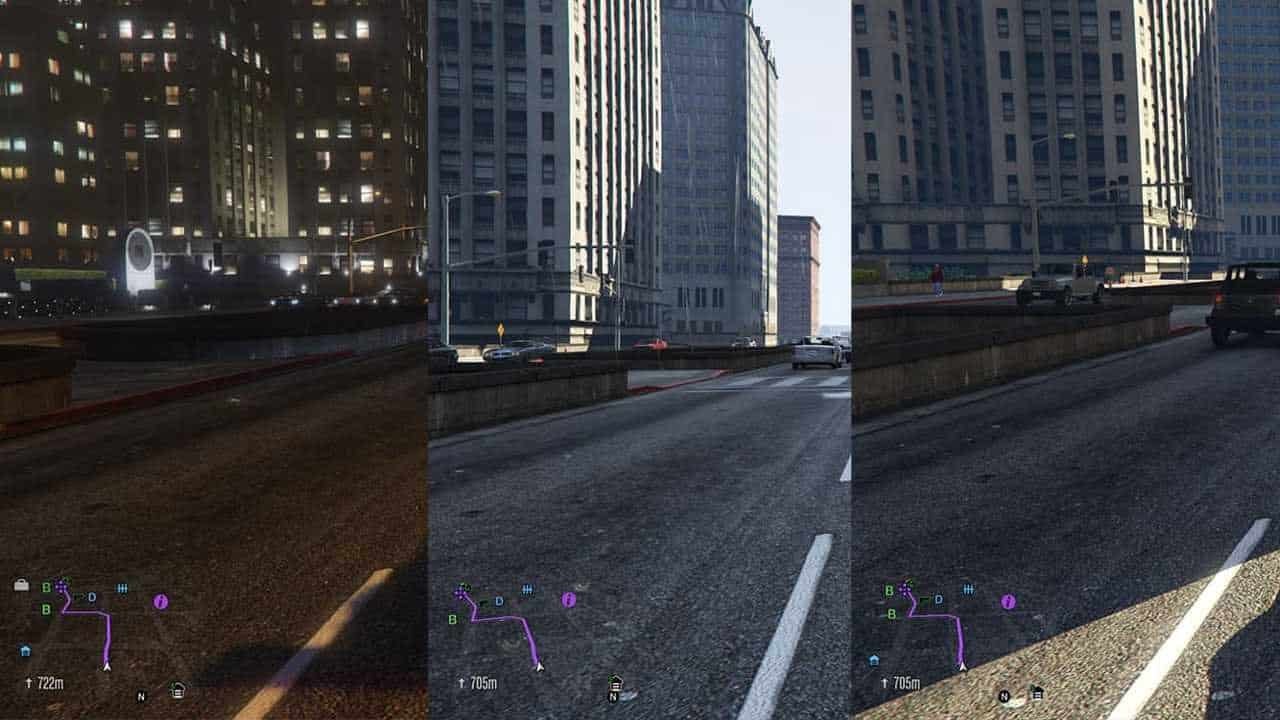
Transform your FiveM server’s navigation experience with the Clear MiniMap Overlay. This premium transparent interface enhancement delivers crystal-clear navigation visibility while maintaining immersive gameplay, featuring customizable transparency levels and modern design elements that elevate your server’s visual appeal.
The Clear MiniMap Overlay features an innovative transparent navigation interface with enhanced visibility, customizable opacity settings, and modern design elements. Designed specifically to improve navigation clarity in FiveM servers, this overlay provides players with an unobstructed view while maintaining full minimap functionality and aesthetic appeal.
🗺️ Clear MiniMap Overlay Features:
- 🔍 Crystal Clear Transparency: Advanced transparent overlay technology for unobstructed navigation visibility
- 🎨 Customizable Opacity: Adjustable transparency levels from 10% to 90% for perfect visibility balance
- 📱 Modern Interface Design: Sleek, contemporary minimap styling with clean borders and smooth animations
- 🎯 Enhanced Navigation: Improved waypoint visibility and GPS tracking with clear directional indicators
- 🌈 Color Customization: Multiple color schemes and themes to match your server’s branding
- 📐 Flexible Positioning: Adjustable minimap position and size for optimal screen real estate usage
- ⚡ Performance Optimized: Lightweight overlay with minimal resource usage and smooth rendering
- 🔧 Easy Configuration: Simple setup with user-friendly configuration options and real-time preview
- 🎮 Immersive Experience: Maintains gameplay immersion while providing essential navigation information
- 🔄 Universal Compatibility: Works with all FiveM servers and existing minimap modifications
🏆 Why Choose Clear MiniMap Overlay:
- 🗺️ Dramatically improves navigation visibility without blocking important visual elements
- 🎨 Enhances overall gameplay aesthetics with modern, clean interface design
- ⚡ Zero performance impact with optimized rendering and lightweight code
- 🔧 Incredibly easy to install and configure with instant results
- 🎯 Perfect for roleplay servers requiring immersive navigation solutions
- 📱 Compatible with all screen resolutions and aspect ratios
- 🌟 Regular updates with new features and customization options
- 🛡️ Dedicated customer support and comprehensive documentation included
📋 Clear MiniMap Overlay Technical Specifications:
🚀 Clear MiniMap Overlay Installation & Setup:
📥 Step 1: Download & Extract
- Download the Clear MiniMap Overlay package from your purchase confirmation
- Extract all files to a temporary folder on your computer
- Verify all overlay files and configuration tools are present
📁 Step 2: Client Installation
- Copy the overlay files to your FiveM client directory
- Run the included installation tool for automatic setup
- Backup your original minimap files (recommended)
⚙️ Step 3: Customization
- Launch the configuration tool to adjust transparency and colors
- Select your preferred minimap position and size settings
- Preview changes in real-time before applying
🎮 Step 4: Launch & Enjoy
- Start FiveM and join your favorite server
- Experience the enhanced navigation with clear overlay
- Fine-tune settings as needed for optimal visibility
❓ Clear MiniMap Overlay FAQ:
Q: Will this overlay work with my existing minimap mods?
A: Yes! The Clear MiniMap Overlay is designed to be compatible with most existing minimap modifications. It enhances rather than replaces your current setup.
Q: Can I adjust the transparency level in real-time?
A: Absolutely! The overlay includes hotkey controls for instant transparency adjustment during gameplay, allowing you to find the perfect visibility balance.
Q: Does this affect my FPS or game performance?
A: Not at all! The Clear MiniMap Overlay is highly optimized and uses less than 1% of your system resources. You won’t notice any performance impact.
Q: Can I use this on any FiveM server?
A: Yes! This is a client-side modification that works on all FiveM servers. It doesn’t require any server-side installation or permissions.
Q: How do I revert to the original minimap if needed?
A: The installation process creates automatic backups of your original files. You can easily restore them using the included uninstaller tool.
🎯 Clear MiniMap Overlay Customization Guide:
🎨 Visual Customization
- Adjust transparency levels from 10% to 90% for perfect visibility
- Choose from 20+ pre-designed color themes and schemes
- Customize border styles, thickness, and corner rounding
- Enable or disable various visual effects and animations
📐 Position & Size Settings
- Adjust minimap position anywhere on your screen
- Scale the minimap size from 50% to 200% of original
- Configure aspect ratio and shape preferences
- Set up multiple profiles for different gameplay scenarios
⌨️ Hotkey Configuration
- Set custom hotkeys for transparency adjustment
- Configure quick-toggle keys for different overlay modes
- Enable gesture controls for touch-screen devices
- Create macros for instant profile switching
🛠️ Clear MiniMap Overlay Support & Resources:
📞 24/7 Customer Support
Get instant help from our dedicated support team through multiple channels:
- Discord support server with live chat assistance
- Email support with 1-hour response time guarantee
- Video tutorials and step-by-step installation guides
- Community forum with user tips and customization showcases
📚 Learning Resources
- Comprehensive installation and configuration documentation
- Customization tutorials and design best practices
- Troubleshooting guides and compatibility information
- Regular webinars and live customization sessions
🔄 Updates & Maintenance
- Automatic update notifications and easy upgrade process
- Regular new themes and customization options
- Bug fixes and performance improvements with priority support
- Compatibility updates for new FiveM versions and features
Need Help? Visit our Contact Us page or join our Discord Community for instant support!
📊 Clear MiniMap Overlay Performance Metrics:
20+
Custom Themes Available
<1%
Performance Impact
5min
Installation Time
100%
Server Compatibility
Trusted by 8,500+ FiveM players worldwide
Join the community of players who have enhanced their navigation experience with our premium Clear MiniMap Overlay.
Reviews
There are no reviews yet.