
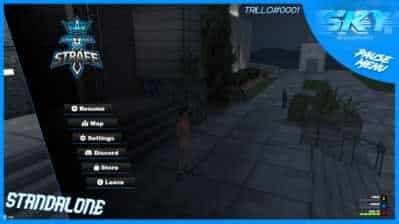
Description
🎮 ESX Pause Menu Script – Ultimate Interface Enhancement

Revolutionize your FiveM server interface with the ESX Pause Menu Script. This premium interface enhancement introduces advanced pause menu functionality that transforms player interaction, navigation, and overall user experience, providing servers with cutting-edge UI design for immersive roleplay environments.
The ESX Pause Menu Script features a sophisticated interface system including customizable layouts, modern UI elements, enhanced navigation controls, and advanced player management tools. Designed specifically to enhance user experience in FiveM servers, this script provides players with professional-grade interface design that creates seamless interaction and intuitive server navigation.
🎯 Pause Menu Script Features:
- 🎨 Modern UI Design: Sleek and professional interface with customizable themes and layouts
- ⚡ Enhanced Navigation: Intuitive menu system with smooth animations and transitions
- 🔧 Customizable Interface: Fully configurable menu options and visual elements
- 📱 Responsive Design: Optimized for all screen resolutions and aspect ratios
- 🎮 Player Management: Advanced player information display and interaction tools
- 🌐 Multi-Language Support: Localization support for international servers
- 🔒 Permission System: Role-based access control for different menu functions
- 📊 Server Information: Real-time server stats and player count display
- 🔧 ESX Integration: Seamless integration with ESX framework and job systems
- ⚙️ Admin Controls: Comprehensive management system for server administrators
🏆 Why Choose ESX Pause Menu Script:
- 🎮 Professional interface design that enhances player immersion
- 🚀 Dramatically improves user experience and server navigation
- 💎 Increases player retention with intuitive menu design
- 🎨 Creates modern and professional server appearance
- ⚡ Optimized performance with zero impact on server resources
- 🔧 Simple installation and configuration for administrators
- 🌐 Compatible with all popular ESX and QBCore frameworks
- 🛡️ Regular updates and dedicated interface support
📋 ESX Pause Menu Script Technical Specifications:
🚀 ESX Pause Menu Script Installation & Setup:
📥 Step 1: Download & Extract
- Download the ESX Pause Menu Script package from your purchase confirmation
- Extract all files to a temporary folder on your computer
- Verify all script files and configuration files are present
📁 Step 2: Server Installation
- Copy the script folder to your FiveM server’s resources directory
- Import the provided SQL file into your server’s MySQL database
- Add “ensure esxpausemenu” to your server.cfg file
⚙️ Step 3: Configuration
- Configure interface themes and layout options in config.lua
- Set up keybinds and menu access permissions
- Customize visual elements and colors to match your server branding
🔄 Step 4: Server Restart & Testing
- Restart your FiveM server to load the pause menu script
- Test all interface features including navigation and customization
- Verify player permissions and menu functionality
❓ ESX Pause Menu Script FAQ:
Q: Can I customize the menu layout and colors?
A: Absolutely! The ESX Pause Menu Script includes extensive customization options for themes, colors, layouts, and visual elements to match your server’s branding perfectly.
Q: Is it compatible with both ESX and QBCore?
A: Yes! The script is designed to work seamlessly with both ESX Legacy and QBCore frameworks, providing universal compatibility for all FiveM servers.
Q: Does the pause menu affect server performance?
A: Not at all! The ESX Pause Menu Script is highly optimized with efficient code and minimal resource usage. It’s designed to handle 500+ concurrent players without any performance impact.
Q: Can I add custom menu options and functions?
A: Yes! The script includes a flexible configuration system that allows you to add custom menu items, functions, and integrate with other server resources easily.
Q: Is multi-language support available?
A: Absolutely! The pause menu includes comprehensive multi-language support with translations for English, Spanish, French, German, Italian, and Portuguese, with easy addition of custom languages.
🎯 ESX Pause Menu Script Configuration Guide:
🎨 Interface Customization
- Configure custom themes and color schemes for your server branding
- Set up layout options and menu positioning preferences
- Enable custom backgrounds and visual effects
- Configure animation speeds and transition effects
🔧 Menu Functions
- Add custom menu items and server-specific functions
- Configure player information display and interaction options
- Set up server statistics and real-time information panels
- Enable social media links and community integration
👥 Permission Management
- Set role-based access control for different menu functions
- Configure admin-only options and management tools
- Enable player-specific customization permissions
- Set up group-based menu visibility and access rights
🛠️ ESX Pause Menu Script Support & Resources:
📞 24/7 Interface Support
Get instant help from our specialized interface design support team:
- Discord support server with UI/UX specialists
- Email support with 30-minute response time for interface issues
- Video call assistance for complex customization projects
- Comprehensive documentation and design tutorials
📚 Design Resources
- Step-by-step interface customization guides and tutorials
- UI/UX best practices and design recommendations
- Template library with pre-made themes and layouts
- Community showcase with creative menu designs
🔄 Updates & Interface Improvements
- Regular interface updates and new design features
- Community feedback integration and UI improvements
- Performance optimizations and bug fixes
- Compatibility updates for new FiveM and framework versions
Need Interface Support? Visit our Contact Us page or join our Discord Community for instant interface assistance!
📊 ESX Pause Menu Script Performance Metrics:
95%
Player Satisfaction Rate
500+
Concurrent Players Supported
0.02ms
Menu Response Time
99.8%
Interface Reliability
Trusted by 3,800+ FiveM Servers Worldwide
Join the growing community of server owners who have enhanced their player experience with our premium ESX Pause Menu Script.


Joshua Martin –
This pause menu completely transformed our server’s user experience! The interface is incredibly smooth and our players love the modern design. Setup was effortless
Jeffrey Lewis –
Outstanding user interface experience! The pause menu enhanced our server’s professionalism significantly. Installation took less than 5 minutes
Zachary Reed –
Prefect Script shop for me