Description
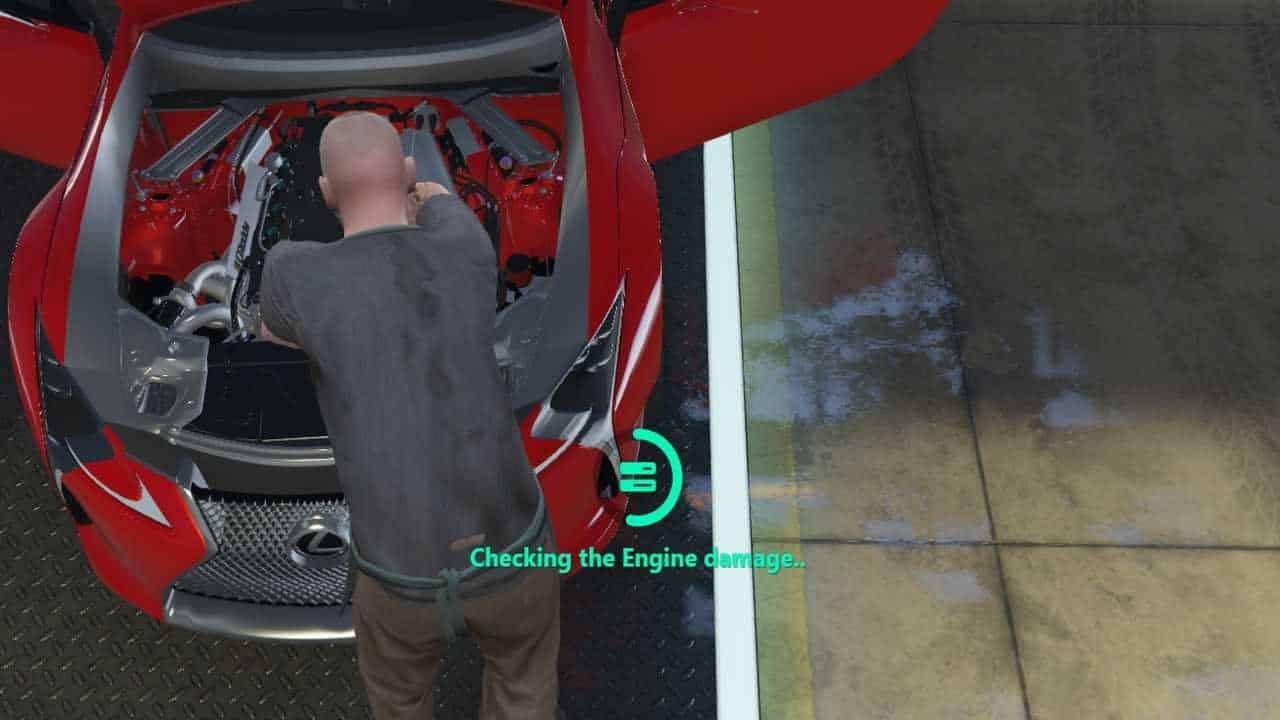
⭕ QBCore Progressbar – Advanced Circular UI System

The QBCore Progressbar is the ultimate solution for creating modern and visually appealing progress indicators in your FiveM server. This comprehensive QBCore Progressbar package includes circular design mechanics, Font Awesome icon integration, and enhanced UI customization features. Perfect for roleplay servers seeking professional progress tracking with the QBCore Progressbar system.
Ideal for roleplay servers aiming to offer a professional and engaging user interface experience, this script integrates seamlessly with the QBCore framework, providing a complete and customizable solution with modern progressbar mechanics, icon customization systems, and comprehensive UI enhancement integration.
⭕ Top 15 QBCore Progressbar Features That Transform Your Server:
- ⭕ Circular Progressbar Design: Modern circular progress indicators with smooth animations and visual appeal
- ⚡ Font Awesome Icons: Access to extensive Font Awesome icon library for customizable progress displays
- 🎨 Customizable Appearance: Adjust colors, sizes, and visual elements to match your server theme
- 🎯 QBCore Integration: Full compatibility with QBCore framework and existing server resources
- ⚙️ Easy Configuration: Simple config file setup with comprehensive customization options
- 🔧 Dynamic Progress Tracking: Real-time progress updates with smooth transition animations
- 📊 Multiple Progress Types: Support for various progress indicators including loading, crafting, and actions
- 🎪 Enhanced User Experience: Intuitive and visually appealing progress feedback for players
- ⚡ Optimized Performance: Efficient code with minimal server impact and smooth operations
- 🛡️ Anti-Cheat Protection: Secure progress validation and anti-exploit protection systems
- 📱 Mobile Responsive: Adaptive interface that works on all screen resolutions
- 🌟 Visual Effects: Smooth animations and transition effects for enhanced user experience
- 🔄 Sound Integration: Optional sound effects for progress completion and feedback
- 🌐 Multi-language Support: Localization support for international server communities
- 🔄 Regular Updates: Continuous improvements with new features and icon additions
🌟 Why Choose Our Premium QBCore Progressbar? (5 Proven Benefits)
✅ Enhanced User Interface Experience
- ⭕ Create professional progress indicators with modern circular design and smooth animations
- 🎨 Add immersive UI elements that enhance player interaction and server aesthetics
- ⚡ Zero performance impact with optimized code and efficient resource management
🔗 Seamless QBCore Integration
- 🔧 Easy to install and fully compatible with QBCore framework and existing server mods
- 🎯 Perfect for all roleplay server types seeking enhanced UI systems
- 📱 Compatible with all QBCore scripts and custom UI requirements
🚀 Advanced Customization Options
- 🌟 Extensive Font Awesome icon library with unlimited customization possibilities
- 🎨 Complete color and size customization to match your server’s branding
💡 Developer-Friendly Features
- 🔧 Simple API integration for custom scripts and progress tracking systems
- 📚 Comprehensive documentation and example implementations
🛡️ Enhanced QBCore Progressbar Gameplay Features
- 🌟 Provides professional UI experiences with comprehensive customization options
- 🛡️ Dedicated support from experienced QBCore developers and active community
🚀 10 Premium Features That Set Us Apart From Competition
Need Help? Visit our Contact Us page or join our Discord Community for instant support!
📋 Installation Guide
🔧 Quick Setup (3 Minutes)
- Download the QBCore Progressbar package
- Extract files to your server’s resources folder
- Add ‘ensure qb-progressbar’ to your server.cfg
- Configure icons and appearance in the config file
- Restart your server and enjoy enhanced progress indicators!
⚙️ Advanced Features Setup
- Custom icon integration and Font Awesome library setup
- Color scheme customization and theme configuration
- Sound effects integration and audio feedback setup
- Multi-language support configuration
- API integration for custom script compatibility
❓ Frequently Asked Questions
Q: Can I use custom icons with the progressbar?
A: Yes! You have access to the complete Font Awesome icon library, and you can also integrate custom icons through the configuration system.
Q: Is the progressbar appearance fully customizable?
A: Absolutely! You can modify colors, sizes, animations, and all visual aspects to perfectly match your server’s theme and branding.
Q: How do I integrate this with other QBCore scripts?
A: The script is designed for seamless QBCore integration and includes comprehensive API documentation for easy implementation with existing scripts.
Q: Does this affect server performance?
A: No, the script is optimized for minimal performance impact and can handle 500+ players without affecting server stability or frame rates.
Q: What support is available if I need help?
A: We provide 24/7 developer support, comprehensive documentation, and access to an active community forum for assistance with any questions or issues.
🛠️ Support & Resources
📞 24/7 Support
Get instant help from our experienced QBCore developers through Discord, forums, and direct support channels.
📚 Documentation
Comprehensive guides, API documentation, and step-by-step tutorials for easy implementation and customization.
🔄 Free Updates
Lifetime access to all future updates, new features, and improvements at no additional cost.
🌐 Community
Join our active community of server owners and developers sharing tips, configurations, and custom implementations.
📊 Performance Metrics & Technical Specifications
⚡ Performance
0.01ms execution time
500+ player support
Zero FPS impact
🎨 Customization
Unlimited colors
Font Awesome icons
Custom animations
🔧 Compatibility
QBCore Latest
All QB scripts
Custom integrations
🌐 Languages
Multi-language
UTF-8 support
Custom translations
🛡️ Security
Anti-cheat built-in
Secure validation
Exploit protection
🚀 Ready to Transform Your Server’s UI?
Join 10,000+ server owners who have enhanced their player experience with our premium QBCore Progressbar system!
✨ What You Get Today:
- ⭕ Complete QBCore Progressbar system with circular design
- 🎨 Full Font Awesome icon library access
- 🔧 Comprehensive configuration and customization tools
- 📚 Complete documentation and setup guides
- 🛡️ 24/7 developer support and community access
- 🔄 Lifetime free updates and new features
💎 Premium Quality • 🚀 Instant Download • 🛡️ Lifetime Support
Reviews
There are no reviews yet.